
Improve understanding
Show equipment, spatial relationships and process steps that are difficult to communicate through text or flat images.
Help learners explore equipment, practise procedures, inspect components and make workplace decisions inside a browser-based 3D environment. We build from your SOPs, equipment references and operational knowledge, then deliver through your LMS or as secure hosted access. No VR headset required.
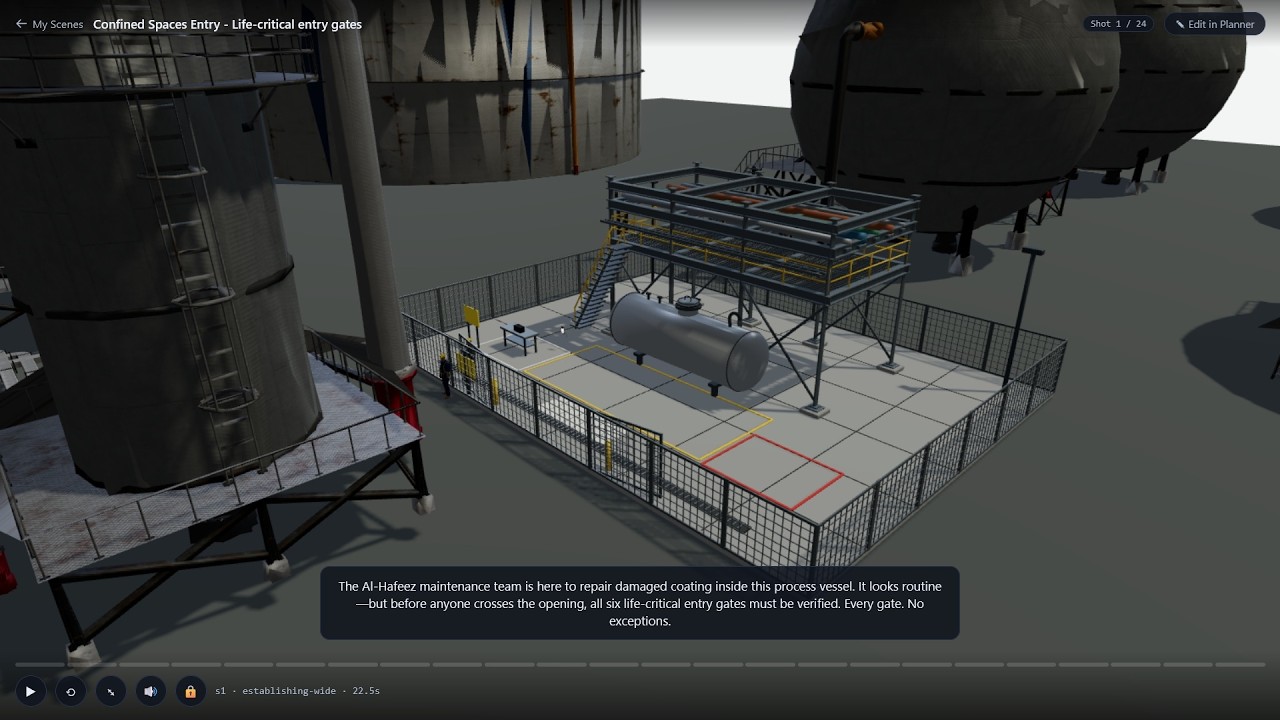 Watch an example
 Interactive 3D is useful when equipment is unavailable for repeated training, internal components are difficult to see, a procedure depends on the correct sequence, or a workplace decision needs context. It complements videos, courses and supervised practice by giving learners a repeatable environment in which to explore and act.
Show equipment, spatial relationships and process steps that are difficult to communicate through text or flat images.
Give employees a repeatable introduction to the equipment and procedure before they enter the workplace or use the physical asset.
Use the simulation for familiarisation and initial practice when live equipment is busy, remote or unsuitable for repeated demonstration.
Give teams, shifts and locations the same procedure, terminology and feedback.
Use completion and assessment results to see where additional explanation, coaching or practical supervision is required.
Examine components, internal assemblies, work areas and points of interest from the viewpoints provided.
Complete steps, place components and follow the required sequence.
Identify conditions, examine visual details and read gauges, panels or instruments in context.
Choose a response and see its operational, quality or safety consequence play out.
Confined-space entry demonstrates several capabilities in one scenario: exploring an environment, identifying hazards, checking a procedure and deciding whether conditions are safe to proceed. The learner practises these decisions before supervised practical training.
The same interaction model can support equipment operation, maintenance procedures, assembly, inspection, troubleshooting, technical onboarding and other workplace training requirements.
Every scenario is built from your own equipment, procedure and workplace and technical reference material — photos, manuals, SOPs, CAD files or engineering drawings if you have them. Existing CAD or detailed drawings produce the most precise result; photos and written procedures are workable but may need some modelling assumptions. Where the available references leave gaps, we identify the required assumptions and confirm them with your subject-matter expert before production.
Identify the learning objective, equipment, procedure and required decisions.
Map the environment, interactions, sequence and assessment approach.
Create the scenario and review technical assumptions with the client's subject-matter expert.
Deliver through the enrolment and reporting system your organisation already uses.
Provide access through a controlled web link when LMS deployment is not required.
Use mouse or touch controls in a modern browser; device suitability is confirmed during scoping.
Configure captions, interface text and voiceover for the required languages.
Tell us about one piece of equipment, procedure or workplace situation. We will review the learning requirement, available reference material and delivery needs before recommending the appropriate interaction approach.
Introduce components, controls and internal assemblies.
Practise the required sequence before supervised work.
Examine equipment conditions, visual indicators and instrument readings.
Rehearse component placement and procedural order.
Prepare new employees before they enter the operational environment.
Practise hazard checks, isolation and response decisions.
See how Interactive 3D Training applies to manufacturing equipment and procedures
Help operators and technicians understand machinery, practise maintenance and changeover procedures, inspect components, interpret instruments and prepare for safety-critical work.
Explore 3D Training for ManufacturingLet workers explore site conditions, inspect access equipment, identify hazards and rehearse procedures such as scaffolding checks, excavation preparation and fall-protection decisions.
Discuss a Construction Training RequirementPractise equipment familiarisation, warehouse orientation, loading procedures, racking inspection, forklift decisions and material-handling workflows before the learner works in the live environment.
Discuss a Logistics Training RequirementThe same approach can be configured for utilities, energy, field service, technical education and other equipment-intensive environments.
Send us one training requirement. We will assess whether interactive 3D is appropriate and outline the reference material, delivery approach and proposed scope.